Digital, electronic, shared — they're all the same thing.
A digital family calendar (or electronic family calendar, or family calendar display, or shared family calendar) is an app or device that keeps the whole household in one color-coded view — the calendar, the chores, who has to be where — visible to everyone and updatable from anywhere.
The category splits two ways. Hardware-led options (Skylight, Hearth) sell a touchscreen — $169.99 to $599.99 for a Skylight, $699 for a Hearth — and charge a yearly subscription on top. App-ledoptions (HomeHQ, Cozi, Mango Display) run on devices you already own, and mostly cost less. This guide walks through the main options and helps you pick. If you already know you want software rather than a screen, see our best family calendar app guide instead.
Every option, compared.
The same family-calendar features, dressed up in different boxes. Prices verified September 2026.
HomeHQ
Fair warning: HomeHQ is ours. We built the family command center we wanted and couldn't buy. It runs on the iPad you already own plus everyone's iPhone, on one $12/month (billed annually) subscription, and it sits on the Google Calendar your family already uses — connect once and it syncs two-way, color-coded per person.
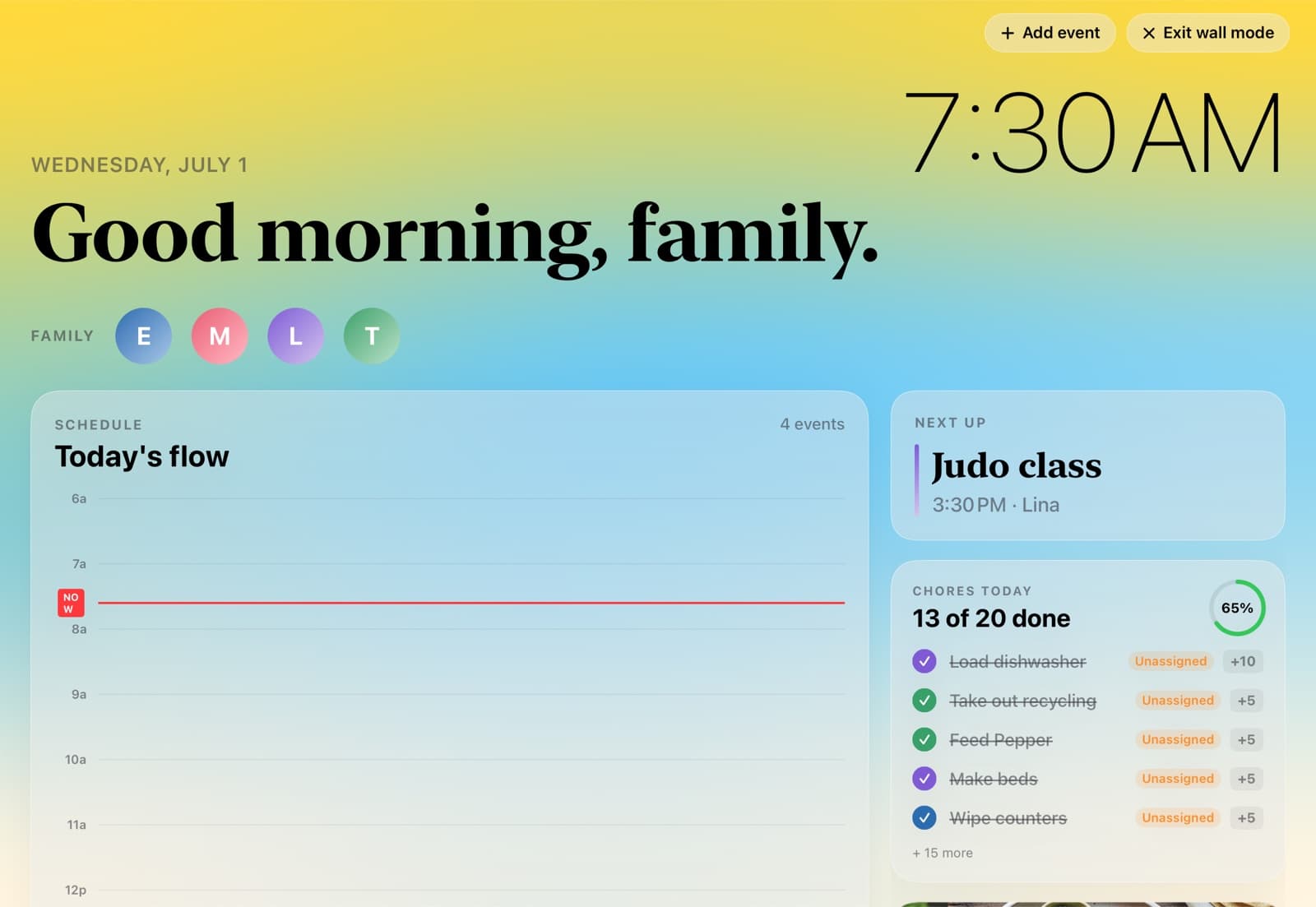
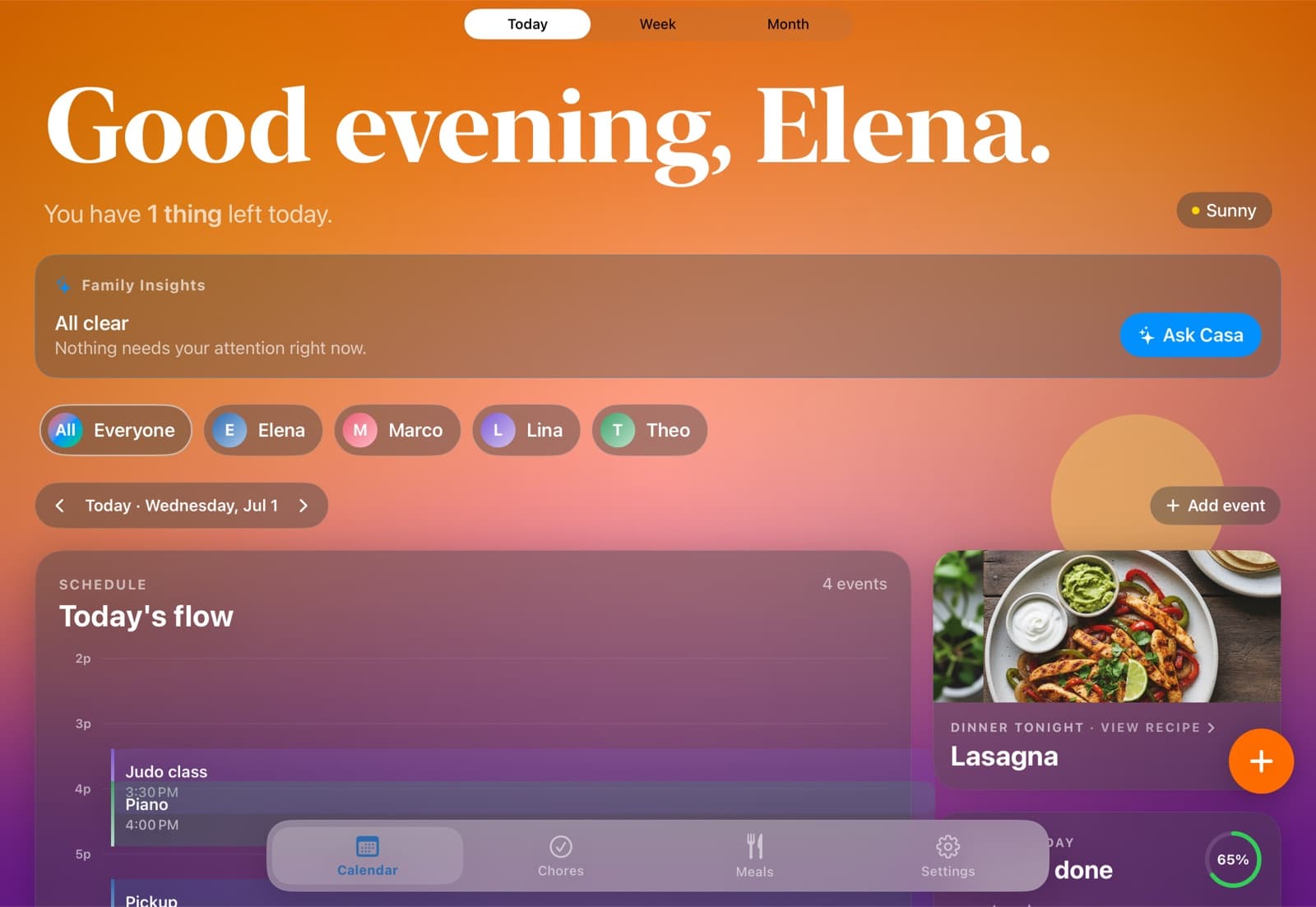
On top of the calendar: chores that can be fixed, rotating, or up for grabs, with points and streaks; per-person views so a kid opens the app and sees their own day; and Casa, an assistant you can type to or hold a button and talk to. Casa does the work rather than describing it — "move judo to Thursday", "give the recycling to Theo this week", "what has Lina got on Friday" — and you get a one-tap undo on whatever it just changed. Photograph a school flyer and it reads the page and proposes the events; you tick the ones you want. A parents-only Family Insights card flags conflicts and lopsided chore weeks. On the kitchen iPad, wall mode turns the app into a full-screen board and ambient mode rotates panes once nobody has touched it for a few minutes. If you want a screen that ships in a box instead, look at Skylight or Hearth below.
Skylight Calendar
Skylight is the market leader for dedicated family calendar displays, and says over a million households use one. The hardware is good: a 10", 15" or 27" touchscreen, wall-mountable, with chore charts, meal planning, color-coded family members, and Sidekick AI. Magic Import — forward an email, or send a photo of a flyer, and the events appear in the calendar — is the feature most reviewers point to. It sits behind Plus, and the flyer route is email-and-upload rather than an in-app camera.
The math is closer than it used to be. The 10" is $169.99, and with $79/year Plus on top that is $406.99 over three years, about $25 less than HomeHQ. The 15" is $299.99, or $536.99 over three years, and the 27" Max is $599.99. So the honest split: at the small size Skylight is the cheaper buy and the question is whether you want a second screen in the house at all; at 15" and up we cost less. The 120-day return window is generous, and there is a separate three-year Skylight Promise.
Hearth Display
Hearth Display was co-designed with child development specialists, and you can feel it. Visual routines with age-appropriate icons, star-powered rewards for completing them, a "Family Rhythm Summary" that tells you how the week went. The hardware is the most beautiful in the category.
It's also the most expensive: $699 list for the display — discounted often enough that it's worth waiting — plus $9/month, or $86.40 a year, for Hearth Helper, meal planning, routines and Privacy Mode. First-year cost is $785.40 and three years is $958.20. The Membership isn't optional either: you need it to set the display up at all, and it auto-renews and isn't refundable.
Cozi
Cozi has been the default app-first electronic family calendar for over a decade. Color-coded calendar, shared shopping list, recipes, basic chore tracker. The shopping list — multiple family members adding and checking off in real time — is still one of the best in the category.
The free tier now caps the calendar at 30 days ahead, which sent a lot of longtime users looking around. Gold lifts that for $39 a year and covers up to 12 people, and a newer Max tier at $79 adds AI event import, recipes and meal planning. We should be straight about this: over three years Gold is $117 against our $431.97, so if the shared calendar and the shopping list are the whole job, Cozi is the better buy. What you don't get is true two-way Google sync — Cozi reads your Google calendar in and publishes an iCal feed out, but edits don't write back.
Mango Display
Mango Display is philosophically closest to HomeHQ: no hardware sales. The app runs on a smart TV, a $40 Fire TV Stick, an Echo Show, an old iPad, a Windows PC, a browser or a Raspberry Pi. If you already own one of those, you get the wall display without buying one.
Pro is $59.99 a year and does more than we used to give it credit for: two-way Google sync, chores and rewards with per-member assignment and points, family profiles you can filter each screen by, and a meal-plan widget. At a third of our price that is a real alternative. What it doesn't have is the proactive side — nothing reads a flyer for you, and nothing flags a clashing Tuesday before you hit it.
Google Calendar
A real family-calendar setup using Google Calendar — one shared family calendar plus per-person calendars, color-coded, shared with edit permissions, subscribed on every phone — is genuinely free and works fine. We wrote a step-by-step guide.
What you lose: chore rotation, an always-on kitchen display, kid-friendly views, and a single screen the whole household updates. Google Calendar is a calendar. A family command center is the layer most households add once calendar-only stops being enough.
Three ways to mount the iPad in your kitchen.
If you already own an iPad, this is how it becomes the kitchen board. Counter, wall, or fridge, and none of them cost more than $120 in hardware.
Counter
A weighted stand on the kitchen counter near the coffee machine. Five minutes, no drilling.
Wall
Flush wall mount with the cable run behind the wall or a cabinet. Looks intentional, and it's the closest analog to a dedicated family calendar display.
Fridge
Magnetic fridge mount with a USB-C charger snaking up. No drilling, no commitment.
Each person can cut it down to their own slice.
A digital family calendar fails if a 9-year-old has to scroll past their parent's standup. Everyone reads the same family calendar, and anyone can filter it down to just their day.
Sees the whole family calendar: both kids' schedules, school events, and every chore on the board.
Filters the family calendar down to her own day, plus her chores. She can add events too.
Filters down to just his own day, with his chores under it and nothing else to wade through.
The family display, morning to night.
Wall mode changes with the sun and with the weather outside — warm in the morning, bright at midday, dusk by evening, and dimmer once it's late. Leave the iPad alone for a few minutes and ambient mode starts rotating full-screen panes: the family's day, then each person, then the evening. Schedule, family and chores stay legible the whole time.
One calendar. Everyone sees it.
HomeHQ runs on the Google Calendar your family already uses. Connect it once and every change shows up everywhere — the kitchen iPad and every iPhone show the same plan. Nothing to migrate, nobody to convince.
- ✓Change it on any phone — it's right everywhere, including Google Calendar itself.
- ✓Color-coded per person, automatically.
- ✓Add an event on your phone; the kitchen display picks it up within a minute.
- ✓Or snap a paper flyer — HomeHQ reads it and proposes the events; you tick the ones to add.
- ✓It's your real Google calendar — your data stays in your own account.
A quick decision tree.
Three questions narrow this down faster than another comparison table.
Do you want chores on the same screen as the calendar?
If yes, HomeHQ is the clearest choice — one $12/month (billed annually) subscription, built on your Google Calendar, with chores, points and streaks, and Casa to make the change when you ask. If you only need a shared calendar, a well-set-up Google Calendar may be enough.
Do you specifically want a wall screen in a box?
If you want a touchscreen that ships ready-to-mount with no setup, choose Skylight (better price, and the 10-inch undercuts us over three years) or Hearth (better design, and much the most expensive). If you have an iPad already, mounting it gets you the same outcome without buying a second screen.
Are chores and kid routines the main job?
Hearth Display is purpose-built for this with child-development experts, at $958.20 over three years. HomeHQ covers the same ground for $431.97 and no hardware. Cozi Gold, at $117 over the same three years, is the budget option.