One place, instead of five.
A family command center is the single place a household's logistics live — the shared calendar, the chores, the reminders — so everyone can see the same plan instead of juggling a group chat, a fridge whiteboard, and whatever one parent happens to remember.
It can be physical (a wall of whiteboards and paper) or digital (an app on the kitchen iPad and every iPhone). The digital version wins on one thing that matters most: it's always current and in sync, because it's the same calendar on every screen.
Four pieces every family command center needs.
Miss one and it stops being the place people check. Get all four in one spot and the week stops falling apart.
A shared calendar
One color-coded calendar everyone can see — work, school, activities, appointments — instead of living in one parent's head.
Chores everyone can see
Who does what, when. Fixed, rotating, or up for grabs, with streaks and a leaderboard, so accountability doesn't have to mean nagging.
A fast way to get things in
The command center dies the week adding something becomes a chore. In HomeHQ you can hold a button and say "Theo has a dentist appointment Thursday at four", or photograph the flyer that came home in a backpack and tick the events you want off it.
An always-on display
A screen in the kitchen everyone glances at. The command center only works if it's visible without unlocking a phone.
On the wall, or on a screen.
Both work. Only one stays current when you're standing in the grocery store.
A whiteboard, a paper calendar, a chore chart, a stack of magnets. Cheap and tactile, but always a week behind, invisible when you're not home, and re-written by hand every Sunday.
The same four pieces, on the iPad in your kitchen and every iPhone. Anyone in the family can change something from wherever they are, and the other screens pick it up within about a minute. Built on the Google Calendar you already use.
The whole household, on the kitchen iPad.
HomeHQ is a family command center built for the iPad in your kitchen. Wall mode turns the whole app into a household board: the day, who's doing what, and the chores nobody has ticked yet. Leave it alone for a few minutes and ambient mode takes over, rotating full-screen panes you can read from across the room. The same plan is on every iPhone, through the Google Calendar you already use.
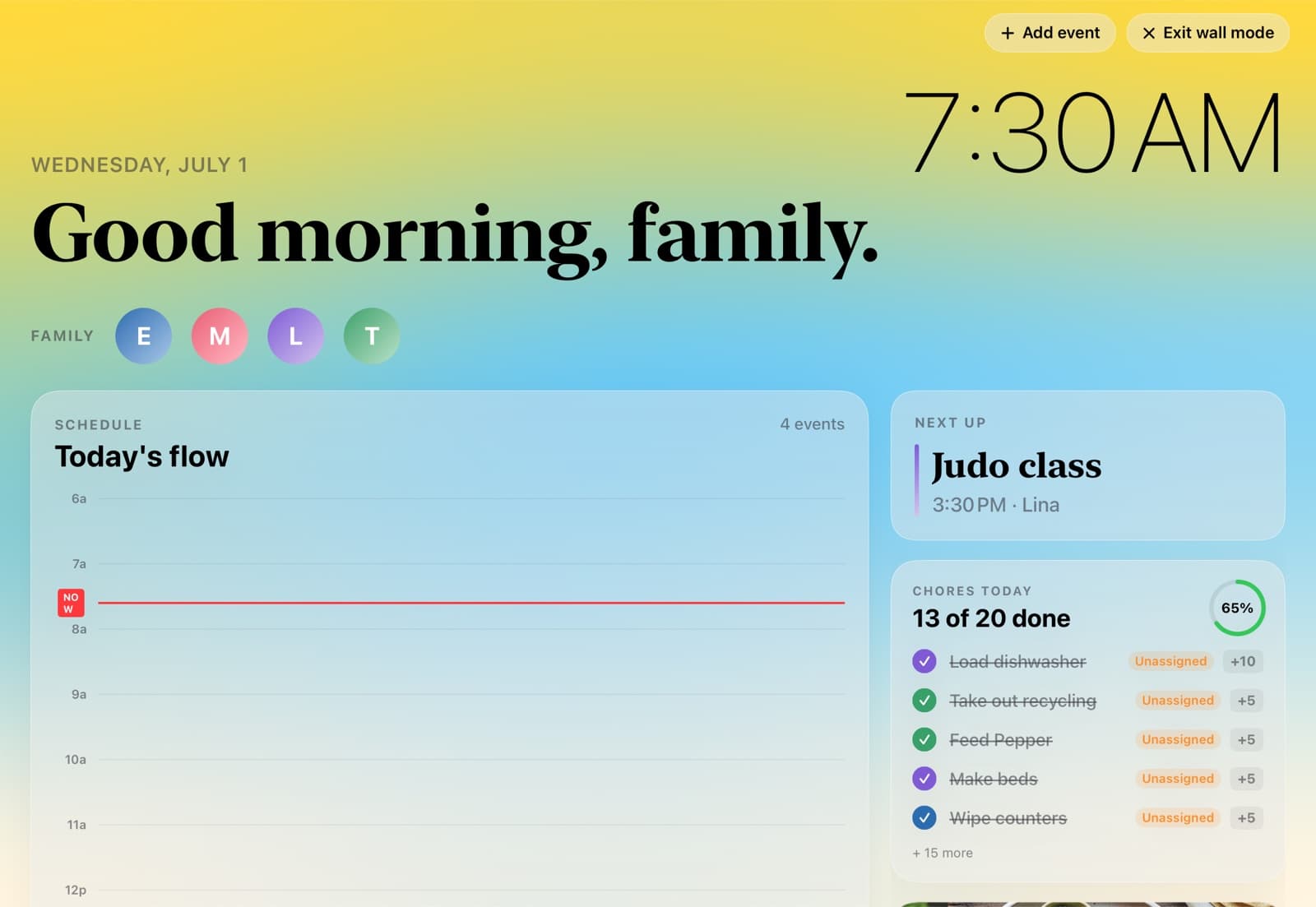
One calendar. Everyone sees it.
HomeHQ runs on the Google Calendar your family already uses. Connect it once and every change shows up everywhere — the kitchen iPad and every iPhone show the same plan. Nothing to migrate, nobody to convince.
- ✓Change it on any phone — it's right everywhere, including Google Calendar itself.
- ✓Color-coded per person, automatically.
- ✓Add an event on your phone; the kitchen display picks it up within a minute.
- ✓Or snap a paper flyer — HomeHQ reads it and proposes the events; you tick the ones to add.
- ✓It's your real Google calendar — your data stays in your own account.